> ## Documentation Index
> Fetch the complete documentation index at: https://docs.quantumproxies.net/llms.txt
> Use this file to discover all available pages before exploring further.
# Buy & Generate Proxies
> Follow the steps below to buy a plan, activate it, and obtain proxy you can use right away
This guide explains how to **purchase** proxy plans on Quantum Proxies and how to **generate** usable proxy credentials (residential, datacenter, mobile, rotating or sticky) from the Dashboard and via the API.
## Short workflow
You need to have an active account created.
Choose the product type: **Residential**, **Datacenter**, or **ISP**
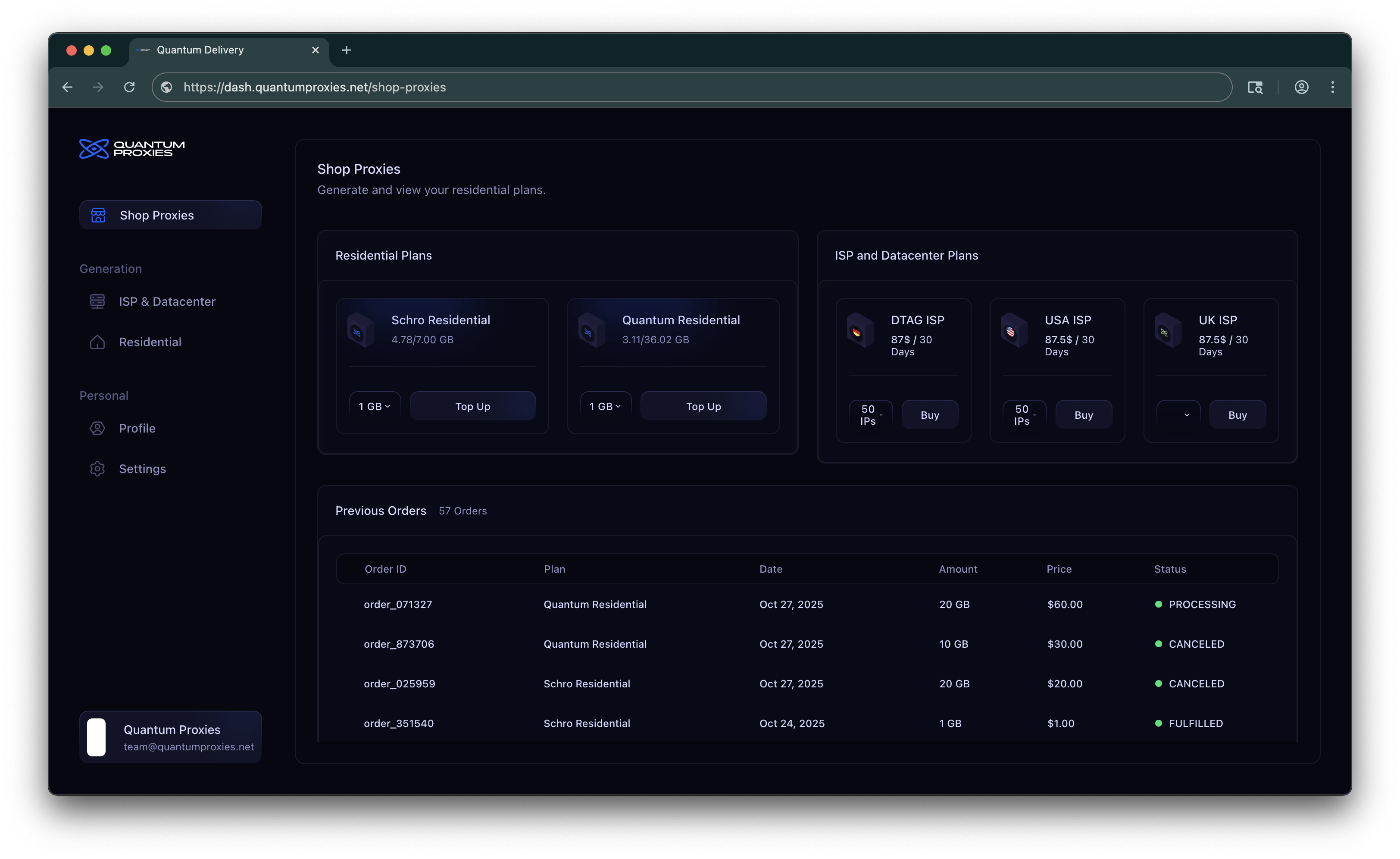 Click **Buy** (or **Top Up**) and complete payment using the available payment methods. \
We support Stripe for card payments and Cryptomus for cryptocurrency payments.
Go to **Dashboard → Generation → ISP & Datacenter / Residential**
Unlike Residential or Mobile proxies, you don’t need to manually generate ISP or Datacenter proxies.
As soon as your payment is confirmed, your ISP/Datacenter proxies will automatically appear in the ISP/Datacenter section of your Dashboard. You can access them immediately, no extra steps required.
From the Dashboard, you can:
* **Download all proxies** as a `.txt` file for bulk usage.
* **Copy proxies directly to your clipboard** for quick setup in your tools or scripts.
ISP/Datacenter proxies are dedicated and static, so once purchased they are instantly provisioned to your account. No configuration or generation logic is needed, you simply buy and start using them.
Residential proxies are IPs from real devices connected through ISPs, making them perfect for web scraping, automation, ad verification, and other use cases that require high trust and low detection rates.
Unlike ISP or Datacenter proxies (which are provisioned automatically after purchase), Residential proxies must be generated inside the Dashboard after you’ve purchased a plan.
Once you have an active Residential plan, you’ll see it listed under **Dashboard → Generation → Residential**.
1. Select your plan
* All your Residential plans are shown in cards.
* Each card displays **remaining bandwidth** and **used bandwidth**.
* Click the plan you want to use for generation.
2. Configure proxy generation
Below the plan list you’ll find the **Generate Residential Proxies** section.
Here you can set:
* **Country** → Choose the country you want your proxies to come from.
* **Format** → Select the output format (e.g., `ip:port:user:pass`).
* **Type** → Choose **Rotating** or **Sticky** proxies.
* *Rotating*: IP changes automatically on each request.
* *Sticky*: IP stays the same for a set duration (e.g. 5m, 30m, 1h).
* **Quantity** → How many proxies you want to generate in one batch.
3. Generate & copy
* Once you’ve configured the settings:
* Click **Generate Proxy**.
* Your proxies will appear in the **Proxy List** panel on the right side.
* From there, you can:
* **Copy** them directly to your clipboard.
* **Download** them as a `.txt` file.
The generated proxies will follow the format you selected, for example:
```text theme={null}
url:port:user_abc312:pass_xxx
url:port:user_abc123:pass_xxx
```
## Billing & limits
The way billing works depends on the type of proxies you purchase.
**Residential proxies** are sold as **one-time packages** based on bandwidth. Every gigabyte of traffic you use is deducted from your package, and once it runs out, you simply purchase a new one.
This makes Residential ideal for flexible or on-demand use, since you only pay for the data you actually consume.
**ISP and Datacenter proxies,** on the other hand, work on a **monthly subscription model**. As soon as your payment is confirmed, the proxies are delivered to you automatically and remain active for the entire subscription period. Because these proxies are static and dedicated, they do not operate with bandwidth limits in the same way as Residential proxies.
In both cases, your Dashboard keeps you informed of your remaining resources and active subscriptions, so you always know where you stand.
if your business requires higher volumes, custom plans, or SLAs, our sales team ([team@quantumproxies.net](mailto:team@quantumproxies.net)) is available to design a solution tailored to your needs.
## Payment Methods
The fastest and most common option.
Pay securely with **credit or debit cards** directly through our Dashboard. \
Your plan activates instantly once payment is confirmed.
Prefer paying with crypto? We’ve got you covered.
Supported coins include **Bitcoin, Ethereum, USDT, and more**. \
Payments are handled by **Cryptomus**, and plans activate as soon as the transaction is confirmed.
Available for larger purchases:
* **One-time buys:** from **\$500**
* **Subscriptions:** from **\$1,000**
If you want to pay by bank transfer, [contact our support team](/essentials/code).\
We’ll provide you with the banking details and guide you through the process.
No matter which method you choose, all payments are processed securely and linked to your account. As soon as your payment clears, your proxies will be ready to use.
## Troubleshooting
* Ensure your plan has sufficient allocation or balance.
* Confirm that `quantity` requested does not exceed plan limits.
* Make sure every generation field is filled before click "Generate" button.
* Choose a different region or datacenter.
* Verify the product type (datacenter for lowest latency).
* Check for rate-limiting or temporary network issues.
* Verify Stripe or payment method status and transaction success.
* Allow a short processing window for some payment methods to clear.
* Contact support with transaction id if your plan remains inactive after payment.
## Support
If you encounter any issues while buying or generating proxies:
* Visit **Docs → Troubleshooting** for common errors.
* Contact support via **Discord** or [**team@quantumproxies.com**](mailto:team@quantumproxies.com) (or your configured contact channels).
Click **Buy** (or **Top Up**) and complete payment using the available payment methods. \
We support Stripe for card payments and Cryptomus for cryptocurrency payments.
Go to **Dashboard → Generation → ISP & Datacenter / Residential**
Unlike Residential or Mobile proxies, you don’t need to manually generate ISP or Datacenter proxies.
As soon as your payment is confirmed, your ISP/Datacenter proxies will automatically appear in the ISP/Datacenter section of your Dashboard. You can access them immediately, no extra steps required.
From the Dashboard, you can:
* **Download all proxies** as a `.txt` file for bulk usage.
* **Copy proxies directly to your clipboard** for quick setup in your tools or scripts.
ISP/Datacenter proxies are dedicated and static, so once purchased they are instantly provisioned to your account. No configuration or generation logic is needed, you simply buy and start using them.
Residential proxies are IPs from real devices connected through ISPs, making them perfect for web scraping, automation, ad verification, and other use cases that require high trust and low detection rates.
Unlike ISP or Datacenter proxies (which are provisioned automatically after purchase), Residential proxies must be generated inside the Dashboard after you’ve purchased a plan.
Once you have an active Residential plan, you’ll see it listed under **Dashboard → Generation → Residential**.
1. Select your plan
* All your Residential plans are shown in cards.
* Each card displays **remaining bandwidth** and **used bandwidth**.
* Click the plan you want to use for generation.
2. Configure proxy generation
Below the plan list you’ll find the **Generate Residential Proxies** section.
Here you can set:
* **Country** → Choose the country you want your proxies to come from.
* **Format** → Select the output format (e.g., `ip:port:user:pass`).
* **Type** → Choose **Rotating** or **Sticky** proxies.
* *Rotating*: IP changes automatically on each request.
* *Sticky*: IP stays the same for a set duration (e.g. 5m, 30m, 1h).
* **Quantity** → How many proxies you want to generate in one batch.
3. Generate & copy
* Once you’ve configured the settings:
* Click **Generate Proxy**.
* Your proxies will appear in the **Proxy List** panel on the right side.
* From there, you can:
* **Copy** them directly to your clipboard.
* **Download** them as a `.txt` file.
The generated proxies will follow the format you selected, for example:
```text theme={null}
url:port:user_abc312:pass_xxx
url:port:user_abc123:pass_xxx
```
## Billing & limits
The way billing works depends on the type of proxies you purchase.
**Residential proxies** are sold as **one-time packages** based on bandwidth. Every gigabyte of traffic you use is deducted from your package, and once it runs out, you simply purchase a new one.
This makes Residential ideal for flexible or on-demand use, since you only pay for the data you actually consume.
**ISP and Datacenter proxies,** on the other hand, work on a **monthly subscription model**. As soon as your payment is confirmed, the proxies are delivered to you automatically and remain active for the entire subscription period. Because these proxies are static and dedicated, they do not operate with bandwidth limits in the same way as Residential proxies.
In both cases, your Dashboard keeps you informed of your remaining resources and active subscriptions, so you always know where you stand.
if your business requires higher volumes, custom plans, or SLAs, our sales team ([team@quantumproxies.net](mailto:team@quantumproxies.net)) is available to design a solution tailored to your needs.
## Payment Methods
The fastest and most common option.
Pay securely with **credit or debit cards** directly through our Dashboard. \
Your plan activates instantly once payment is confirmed.
Prefer paying with crypto? We’ve got you covered.
Supported coins include **Bitcoin, Ethereum, USDT, and more**. \
Payments are handled by **Cryptomus**, and plans activate as soon as the transaction is confirmed.
Available for larger purchases:
* **One-time buys:** from **\$500**
* **Subscriptions:** from **\$1,000**
If you want to pay by bank transfer, [contact our support team](/essentials/code).\
We’ll provide you with the banking details and guide you through the process.
No matter which method you choose, all payments are processed securely and linked to your account. As soon as your payment clears, your proxies will be ready to use.
## Troubleshooting
* Ensure your plan has sufficient allocation or balance.
* Confirm that `quantity` requested does not exceed plan limits.
* Make sure every generation field is filled before click "Generate" button.
* Choose a different region or datacenter.
* Verify the product type (datacenter for lowest latency).
* Check for rate-limiting or temporary network issues.
* Verify Stripe or payment method status and transaction success.
* Allow a short processing window for some payment methods to clear.
* Contact support with transaction id if your plan remains inactive after payment.
## Support
If you encounter any issues while buying or generating proxies:
* Visit **Docs → Troubleshooting** for common errors.
* Contact support via **Discord** or [**team@quantumproxies.com**](mailto:team@quantumproxies.com) (or your configured contact channels).