

Short workflow
1
Sign in to the Dashboard.
You need to have an active account created.
Create your account
2
Select or purchase a proxy plan.
Choose the product type: Residential, Datacenter, or ISP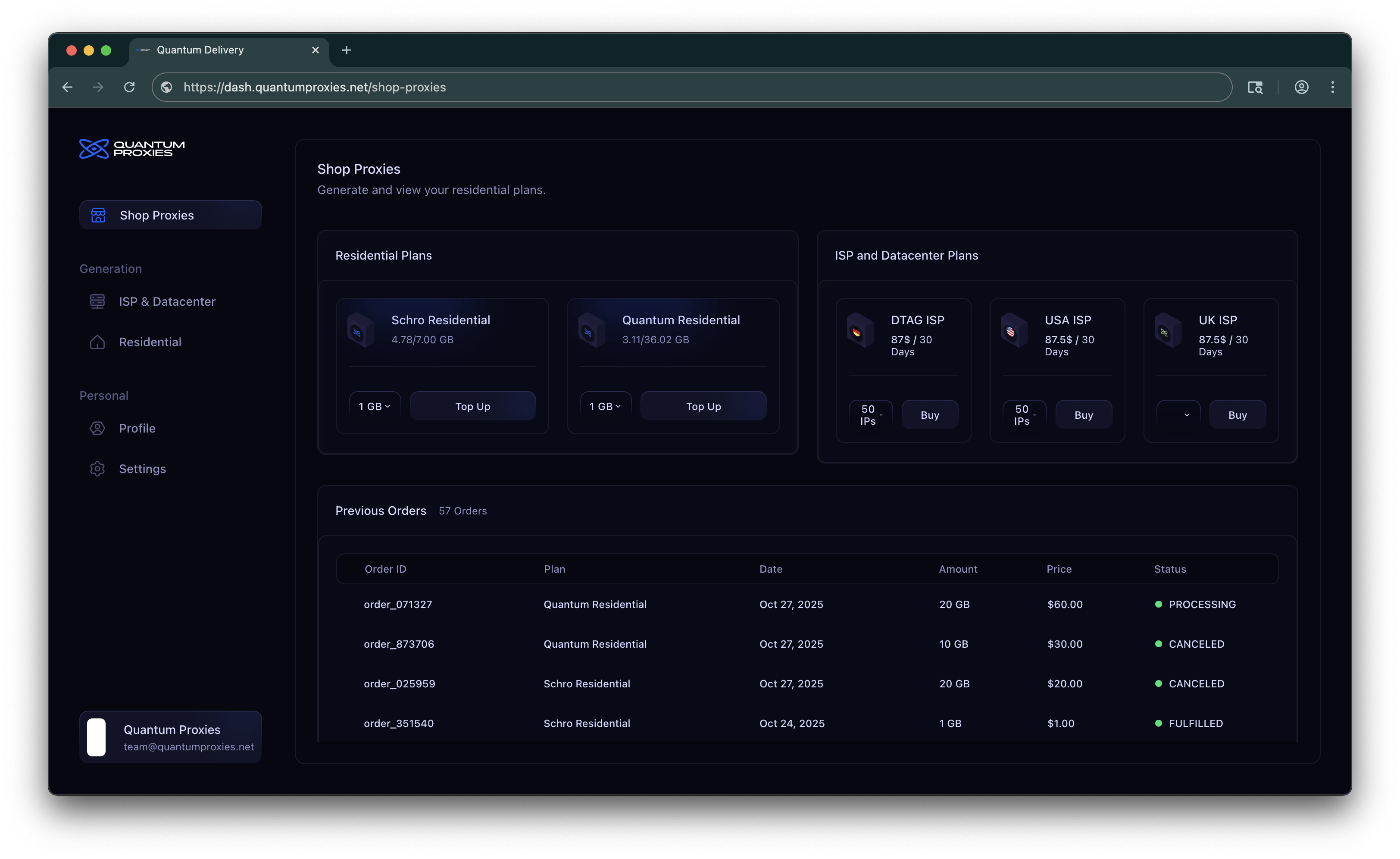
3
Pay
Click Buy (or Top Up) and complete payment using the available payment methods.
We support Stripe for card payments and Cryptomus for cryptocurrency payments.
We support Stripe for card payments and Cryptomus for cryptocurrency payments.
4
Generate proxies
Go to Dashboard → Generation → ISP & Datacenter / Residential
ISP & Datacenter
ISP & Datacenter
Unlike Residential or Mobile proxies, you don’t need to manually generate ISP or Datacenter proxies.As soon as your payment is confirmed, your ISP/Datacenter proxies will automatically appear in the ISP/Datacenter section of your Dashboard. You can access them immediately, no extra steps required.From the Dashboard, you can:
- Download all proxies as a
.txtfile for bulk usage. - Copy proxies directly to your clipboard for quick setup in your tools or scripts.
Residential
Residential
Residential proxies are IPs from real devices connected through ISPs, making them perfect for web scraping, automation, ad verification, and other use cases that require high trust and low detection rates.Unlike ISP or Datacenter proxies (which are provisioned automatically after purchase), Residential proxies must be generated inside the Dashboard after you’ve purchased a plan.Once you have an active Residential plan, you’ll see it listed under Dashboard → Generation → Residential.
- Select your plan
- All your Residential plans are shown in cards.
- Each card displays remaining bandwidth and used bandwidth.
- Click the plan you want to use for generation.
- Configure proxy generation
- Country → Choose the country you want your proxies to come from.
- Format → Select the output format (e.g.,
ip:port:user:pass). - Type → Choose Rotating or Sticky proxies.
- Rotating: IP changes automatically on each request.
- Sticky: IP stays the same for a set duration (e.g. 5m, 30m, 1h).
- Quantity → How many proxies you want to generate in one batch.
- Generate & copy
- Once you’ve configured the settings:
- Click Generate Proxy.
- Your proxies will appear in the Proxy List panel on the right side.
- From there, you can:
- Copy them directly to your clipboard.
- Download them as a
.txtfile.
Billing & limits
The way billing works depends on the type of proxies you purchase. Residential proxies are sold as one-time packages based on bandwidth. Every gigabyte of traffic you use is deducted from your package, and once it runs out, you simply purchase a new one.This makes Residential ideal for flexible or on-demand use, since you only pay for the data you actually consume.
Payment Methods
Stripe
Stripe
The fastest and most common option.Pay securely with credit or debit cards directly through our Dashboard.
Your plan activates instantly once payment is confirmed.
Your plan activates instantly once payment is confirmed.
Cryptocurrency
Cryptocurrency
Prefer paying with crypto? We’ve got you covered.Supported coins include Bitcoin, Ethereum, USDT, and more.
Payments are handled by Cryptomus, and plans activate as soon as the transaction is confirmed.
Payments are handled by Cryptomus, and plans activate as soon as the transaction is confirmed.
Bank Transfer
Bank Transfer
Available for larger purchases:
We’ll provide you with the banking details and guide you through the process.
- One-time buys: from $500
- Subscriptions: from $1,000
We’ll provide you with the banking details and guide you through the process.
Troubleshooting
No proxies returned after Generate
No proxies returned after Generate
- Ensure your plan has sufficient allocation or balance.
- Confirm that
quantityrequested does not exceed plan limits. - Make sure every generation field is filled before click “Generate” button.
High latency or timeouts
High latency or timeouts
- Choose a different region or datacenter.
- Verify the product type (datacenter for lowest latency).
- Check for rate-limiting or temporary network issues.
Billing / purchase not active
Billing / purchase not active
- Verify Stripe or payment method status and transaction success.
- Allow a short processing window for some payment methods to clear.
- Contact support with transaction id if your plan remains inactive after payment.
Support
If you encounter any issues while buying or generating proxies:- Visit Docs → Troubleshooting for common errors.
- Contact support via Discord or team@quantumproxies.com (or your configured contact channels).